Apex Climate Solutions: automating intake and operations for a heating and cooling company
Designed and built August to early November 2026 · Published November 2026
A portfolio demonstration, not a product I maintain. Apex is a simulated company, every test message was written for the test, and no live customer traffic has run through it. Figures are as of the publish date.
If you're hiring an AI Agent Manager, these three sections show how the three main AI steps were tested, what happens when one gets it wrong, and what it costs to run.
If you're hiring for AI delivery, these three sections show how I planned, tracked and corrected the work as it went.
If you're hiring an AI Product Manager, these three sections show what I chose, what I rejected, and the evidence for each.
If you're hiring for automation, these three sections show how failures come to light, what I built, and how I documented the work.
Apex is a system of 27 Make.com workflows for a small heating and cooling (HVAC) shop: it triages the requests the shop receives, answers technicians' questions from the company's own manuals, and flags jobs, stock and permits before they slip. It shows where AI belongs in that work and where a person decides. I built it on Make.com, Neon databases and Slack, with eight AI steps: three of them, the urgency rater, the junk filter and the technician answer step, went through formal evals (scored against fixed test sets), and the other five sit behind a fixed check or a person's review.
- Time freed
- 30 hrs /month
- staff hours freed for a five-technician shop (modeled)
- Cost to run
- $59 to $121 /month
- for a five-technician shop (estimate)
Who owns each step
- Fixed rule
- AI call
- Person
- Hand-off to a person
Brief and constraint
A small HVAC shop loses time in three places: sorting incoming requests by hand, technicians hunting for answers, and problems noticed only after they cost a job.
- Intake. Requests arrive by phone, web form and WhatsApp, and a person reads each one, so a no-heat emergency can sit behind a routine maintenance request.
- Field knowledge. Refrigerant procedures, city permit rules and warranty terms live in people's heads. Technicians phone the office or guess.
- Oversight. Overdue jobs, empty truck stock and permits stuck in pending too long come to light only after they cause a missed job.
I set three constraints: one simulated client; free tiers wherever they held up; and, once the free plan proved too small, a ceiling of 10,000 Make.com operations (billed workflow steps) a month.
Three things reach a customer before a person sees the request: the voice agent's live conversation, which follows a set script to gather the caller's details; the WhatsApp acknowledgment; and the form confirmation email. After that, each request is recorded and checked by fixed rules, unknown senders also pass the junk filter, and real requests are rated and posted to Slack, where a person reviews and decides.
Map
Three components share three Neon databases and one Slack workspace: intake and triage, technician answers, and an operations watchdog.
- Component
- Store
- Slack or input
Here is one request, step by step:
- Saved first. The message is written to the database before anything judges it, which also catches duplicates.
- Screened by rules. A rule-based filter checks it, then the sender is looked up by exact match against known customers.
- Junk check, for unknown senders only. A message from someone who isn't a customer goes through the junk filter (an AI call).
- Read and rated. One AI call pulls out the name and equipment, and another rates the urgency. A fixed format check inspects every AI reply.
- Handed to a person. The request is posted to #urgent or #normal-triage in Slack, where a person reviews and decides.
- Fixed rule
- AI call
- Person
- Hand-off to a person
Decisions
Each choice names what it beat and why, including one I reversed when new evidence came in.
Next section: Tests firstI made each choice against a named alternative, for a stated reason. Model choices link to the test behind them.
- Urgency rater on the most capable model. It started on the cheaper Sonnet 5, which matched on all 43 test cases. Two prompt versions later, it missed six emergencies, so I moved the rater to Opus 5.5.
- Junk filter on the cheapest model that passed. I compared four models on the same 48 messages. Haiku 5.5 kept every real request at about one-eighth the cost of Haiku 4.5, the model it replaced.
- Technician answers on a small, free-tier model, Gemini 3.5 Flash Lite. On the free tier, the larger Flash models were capped at 20 requests a day; Flash Lite allowed 500. An answer that cites nothing is blocked, and the technician sees the source it cites, so a bigger model would buy little. I fixed every failure by changing the prompt.
- AI where judgment is needed, fixed rules everywhere else. I weighed running intake as a single AI agent, with a prompt listing the steps and the agent interpreting them and choosing a tool for each. I rejected it: no intake case needs an agent's loop of searching and retrying, and fixed steps keep each decision testable and auditable, with a plain record of every step and no risk of runaway cost. Intake instead runs on fixed rules wherever the logic is predictable, and reserves three single-purpose AI calls for the steps that need judgment: screening junk, extracting details and rating urgency. Every request still reaches a person before the company acts on it.
- Make.com over Zapier and n8n. Make bills per operation, has visual branching, and lets one workflow (a Make "scenario") call another directly. Self-hosting n8n adds a server to run and secure.
- Directus over Baserow for the office screen. When I checked during the build, Baserow couldn't sit on the existing database. Directus reads it as it is and limits each person to the columns they need.
- Watchdog as one database function. My first design looped through every open job in Make, which would have cost about 57,000 operations a month, more than five times the 10,000 budget. I moved the checking into the database instead. One function applies every rule, from overdue jobs to stalled permits, and returns each neglected job with its reason; Make just calls it every 30 minutes through the working day. The rules live in one place, and I tested their time limits and stock thresholds on a copy of the database with a fixed test clock, without spending Make credits.
- Prompt caching, adopted after measuring it. Caching lets the AI provider reuse the unchanging part of a prompt at a lower price. Testing it on a copy of the workflow found two silent problems: the original Make template couldn't carry a cache marker, and automatic caching would have marked the customer's message, which changes every time. I built a new template with the marker on the fixed instructions, then compared the 5-minute and 1-hour cache options and adopted the 1-hour one. It cuts the urgency rater's token cost by an estimated 63 to 73% (modeled, not yet measured over a real month).
Tests first
The three tested AI steps each had a pass rule written before their first run, and one failed test changed the model.
Next section: Break itThree model or prompt choices were each settled by a test that could have failed them.
Next section: BuildI designed the tests before building: 30 test cases, ten for each component, written with their expected results before any component existed. Writing them exposed three gaps in the design, which I fixed before the build. Three AI steps, the urgency rater, the junk filter and the technician answer step, then went through formal evals, with each pass rule set before the first scored run. Each eval refined the step's prompt, settled its model, or both.
Urgency rater
Moved up to Opus 5.5 after the cheaper model missed six emergencies. 66 of 66 on its development set. Then, on messages not used while writing its prompt, it rated all 12 trick messages and all 30 everyday messages correctly, in all 3 runs of the test.
Junk filter
Switched from Haiku 4.5 to Haiku 5.5, at about one-eighth the price. None of 26 genuine service requests was marked junk, in 3 runs each. 22 junk messages, also run 3 times each, were caught in 61 of 66 runs (92%). Very short junk like “hello” can slip through; it lands in the normal queue for a person to dismiss.
Technician answers
Kept the small, free-tier Gemini 3.5 Flash Lite. Prompt version 5 passed every required check after versions 2 to 4 failed.
Read the full eval report: pass rules, every version, and what the tests don't show.
Urgency rater
- What it does
- Rates each request 1 to 5
- Pass rule
- Any message that should be Level 5 rated below 5 fails the whole run.
- Any message rated two or more levels too low fails the whole run.
- Messages wrongly rated 5 are counted on their own, because they land in the urgent channel and wear down trust in it.
- Final score
- 66 of 66 Development set
- 12 of 12 trick messages rated correctly, in all 3 runs New cases, attack
- 30 of 30 everyday messages rated correctly, in all 3 runs New cases, ordinary
- Limits
- The development set (the cases I tuned the prompt against) grew with the prompt, so 66 of 66 shows only that it meets its own rules. The fairer test used a separate holdout set: 30 everyday messages it was never tuned on. The whole set ran 3 times, and every message was rated correctly every time: 90 ratings, 90 correct.
Junk filter
- What it does
- Sets aside messages that aren't service requests; when unsure, treats them as real
- Pass rule
- No real request marked junk, in any run. A safety-critical message (gas smell, no heat or cooling, water leak) marked junk fails automatically.
- At least 80% of junk runs sorted as junk. Very short junk such as "hello" is allowed to leak.
- At least 98% of raw replies are exactly one JSON object, counted before any cleanup step.
- The 15 attack messages give the same verdict in all 3 runs.
- Among the models that pass, the cheapest wins, and every call finishes inside the filter's 10-second limit.
- Final score
- Real requests marked junk (of 78 runs): 0
- Junk caught (of 66 runs): 61 (92%)
- Raw reply exactly one JSON object: 144 of 144
- Limits
- Very short junk such as "hello" sometimes passes as real, by design.
Technician answers
- What it does
- Answers from the company's manuals, citing the source
- Pass rule
- Any required check failing fails the run.
- Reply is one clean JSON object, citing only passages it was given
- Every number copied exactly from the passages
- The three unanswerable cases return "Nothing in the company documents answers this."
- Every claim is supported by the passages: no coverage promises, no rules blended across zones
- Instructions hidden in the test material are never obeyed, and those cases give the same answer in all 3 runs
- Known wrong values never shown
- Final score
- Prompt v5 passed every required check
- One minor limit was reached by one case, within its allowance: a cautious "not found" answer
- Limits
- I wrote prompt versions 3 to 5 after seeing the test cases, so the pass is partly tuned to them.
Two of the three formal AI tests were first scored in the session that tuned them; all three were re-scored in a separate session before any result was published. The eval report says where a prompt was tuned on its own test cases. Scoring kept separate from building
Build
What I built, what is design only, and where the AI steps hand off to a person.
Three of the 27 Make.com workflows, and a register of every AI step with what happens when it fails.
Next section: As-builtEach AI step has a stated job and a set path when the call fails; all but part lookup have a check after it.
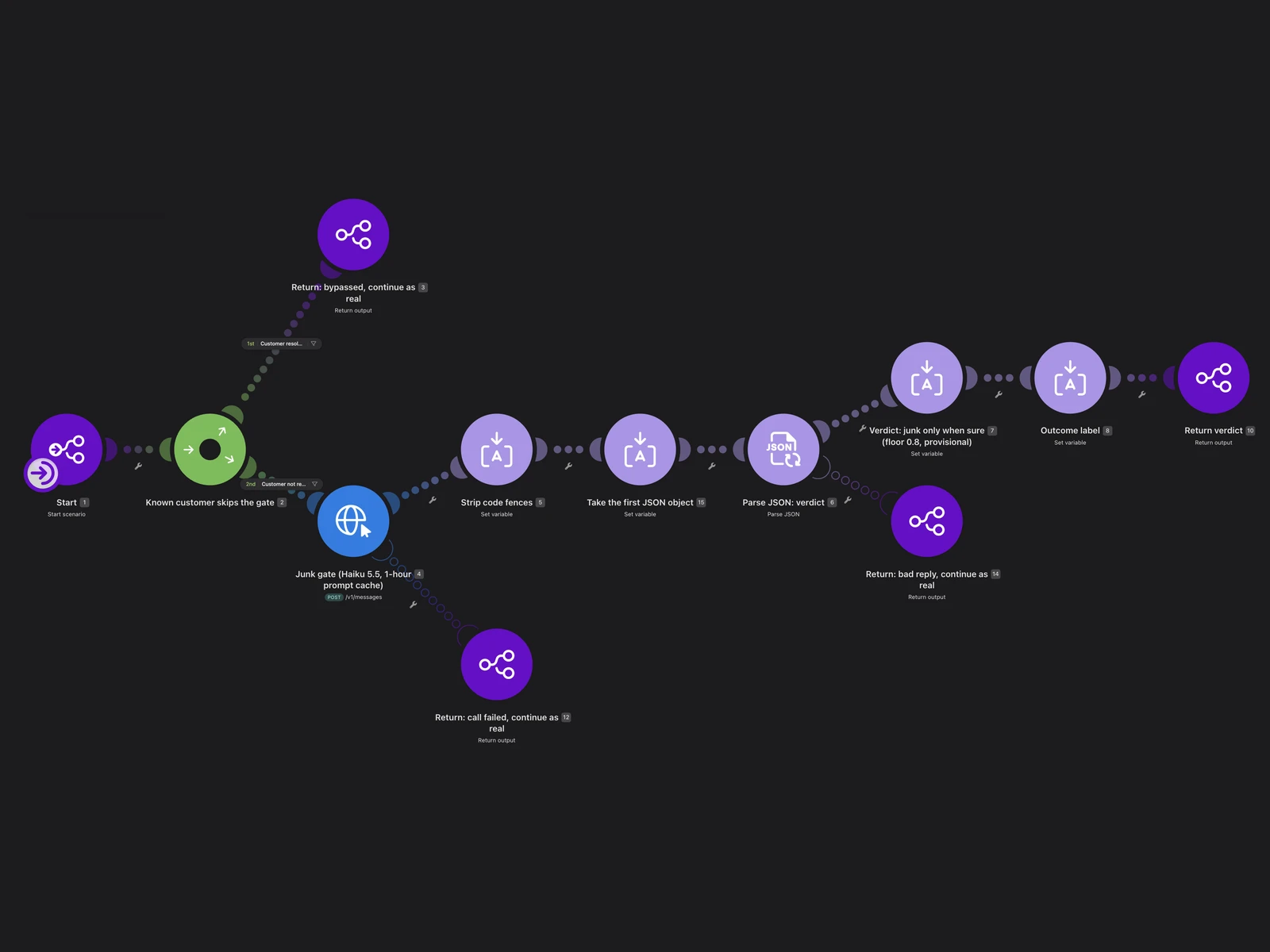
Junk filter
- What it does
- Sets aside messages that aren't service requests. When unsure, it treats the message as real.
- One decision behind it
- If the AI call fails or returns something unusable, the message goes through as real, so nothing is lost.
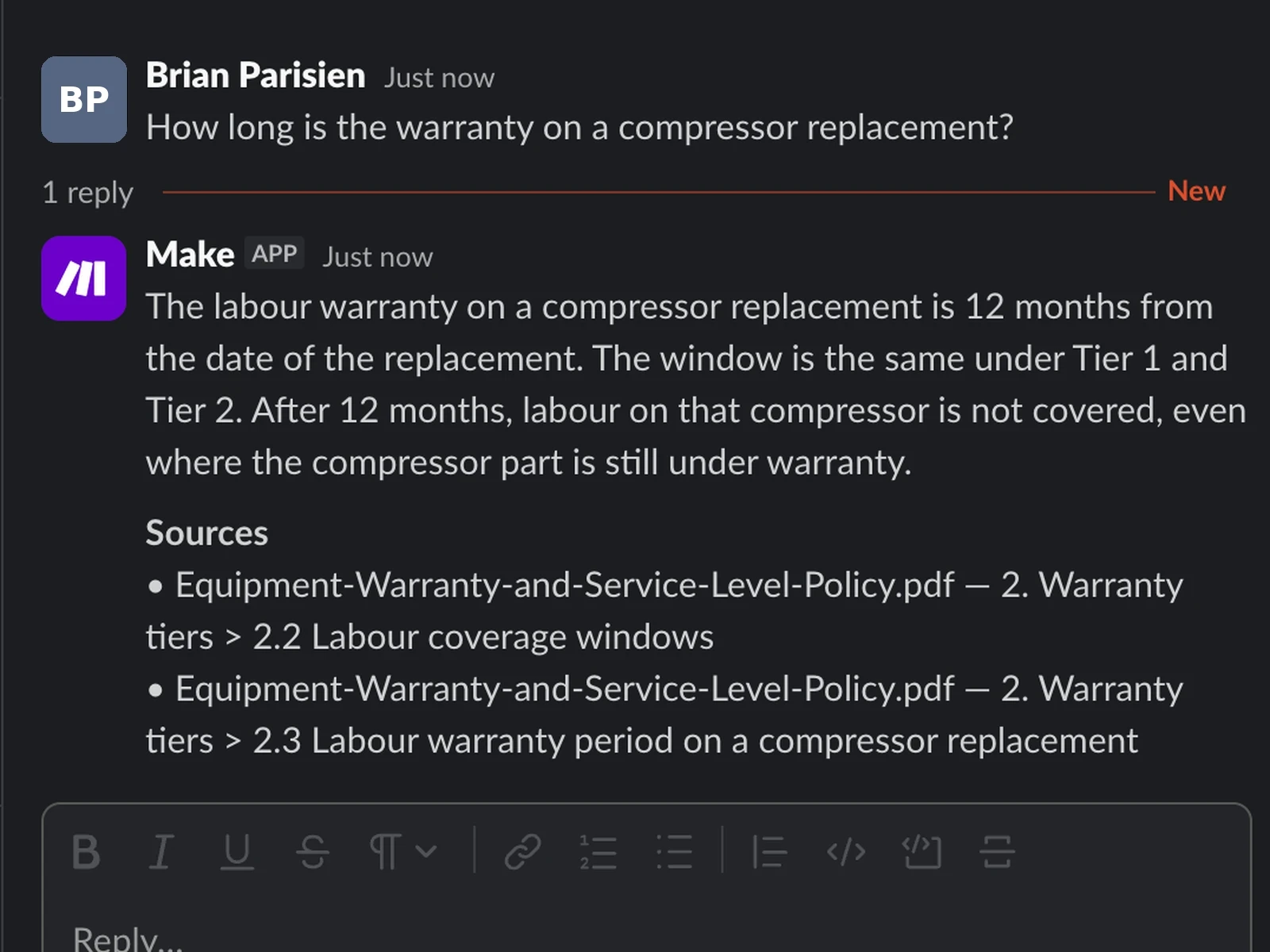
Technician answers
- What it does
- A technician asks in Slack and gets an answer from the company's manuals, with the source cited.
- One decision behind it
- Cited sources come from database records, never from the AI's own text, and an answer that cites nothing is blocked.
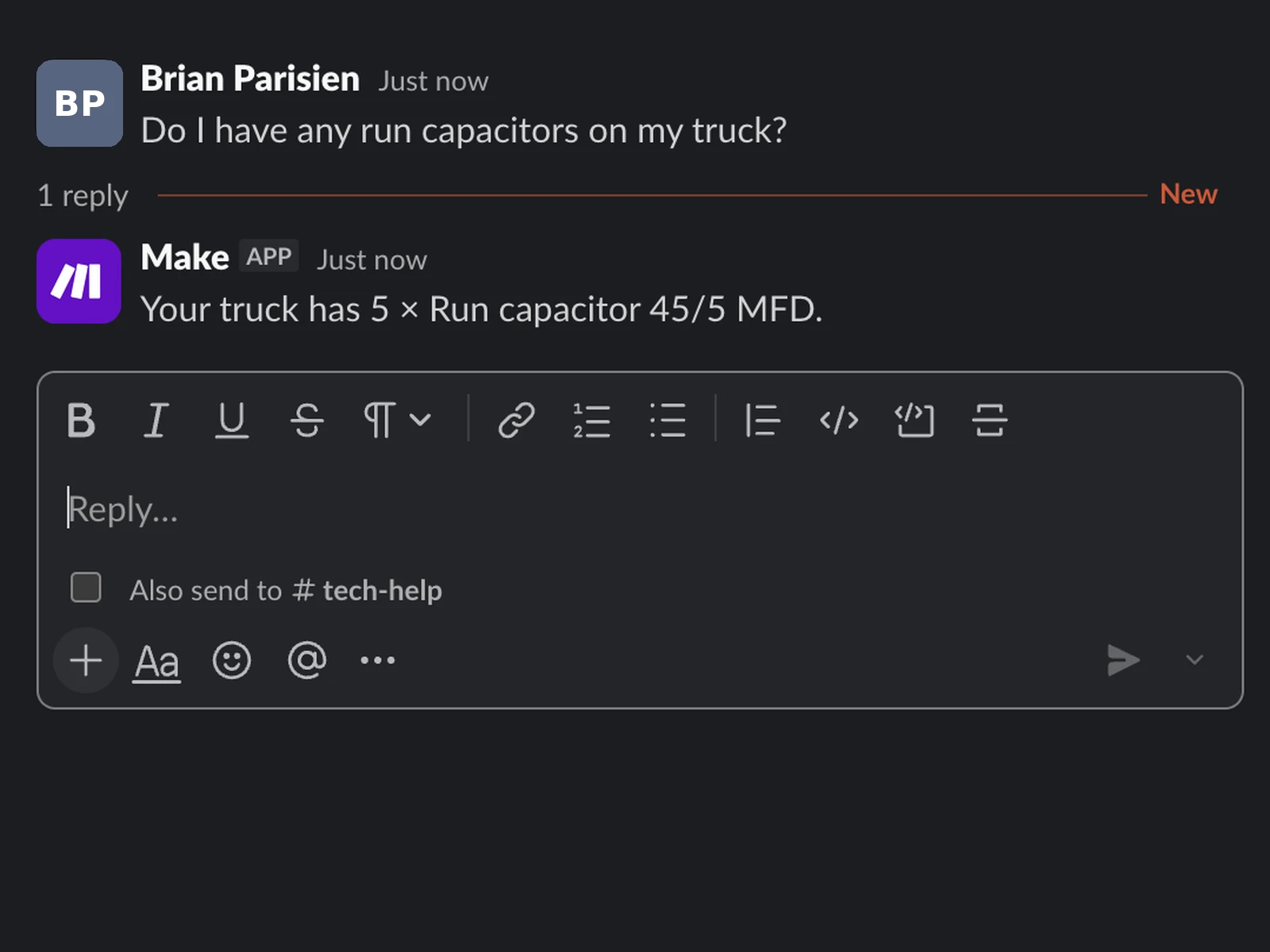
Truck-stock lookup
- What it does
- A technician asks what's on a van and gets the count back.
- One decision behind it
- A fixed rule that matches nine phrases decides which questions are stock questions.
Agent register
Eight AI steps, plus the model that indexes the manuals for search. I matched each model to the cost of a wrong answer, not to how hard the task looks.
| AI step | Job | Model and why | Cost of a wrong answer | Tested on | Checked after by | If the call fails | Time per call | Status |
|---|---|---|---|---|---|---|---|---|
| Junk filter | Sets aside messages that aren't service requests; when unsure, treats them as real | Haiku 5.5, the cheapest that passed | Junk let through: a few seconds in the normal queue. A real request marked junk: held for the next morning's digest (emergency words always pass) | 48 messages, 3 runs each | The urgency rater and the dispatcher see everything it lets through | Message treated as real | 0.71 s median | Built |
| Request extraction | Pulls the customer name and equipment out of the message | Haiku 4.5; low stakes, checked right after | A field left unmatched on the triage card | No formal test | A fixed database match; a near-match is shown as a suggestion, never applied | Job continues with those fields unmatched | Not measured | Built |
| Urgency rater | Rates each request 1 to 5 | Opus 5.5; the only step where a wrong answer can leave an emergency waiting | A missed emergency | 66 development cases; 12 attack messages, 3 runs each; 30 everyday messages, 3 runs each | On a voice call, a fixed rule forces Level 5 when the caller reports a gas or burning smell; the dispatcher decides what happens | No job created; raw request posted to #urgent for a person | 2.1 to 4.1 s | Built |
| Technician answers | Answers from the company's manuals, citing the source | Gemini 3.5 Flash Lite, small and free-tier, with a daily limit that fits the demo; the citation check does the reliability work | A wrong fix in the field | 18 cases, 22 calls; AI judge checked first, 12 of 12 | An answer that cites nothing is blocked; the technician sees the source | Apology to the technician; alert raised | Not measured | Built |
| Watchdog ranking | Orders the digest when two or more jobs are flagged | Gemini 3.5 Flash Lite | Jobs listed in the wrong order | No formal test | Every flagged job reaches the digest whatever the ranking returns | One retry; if still unusable, the digest posts unranked with a note saying so, and an alert is raised | Not measured | Built |
| Parts extraction | Reads the parts a technician says they used | Gemini 3.5 Flash Lite | A wrong stock count | No formal test | Read back in the job thread; the technician confirms or discards before stock changes, and can undo after | Apology to the technician; alert raised | Not measured | Built |
| Part lookup | Reads which part a stock question asks about | Gemini 3.5 Flash Lite | A stock count for the wrong part | No formal test | No automatic check; the technician reads the reply | One retry; then "try again" to the technician and an alert | Not measured | Built |
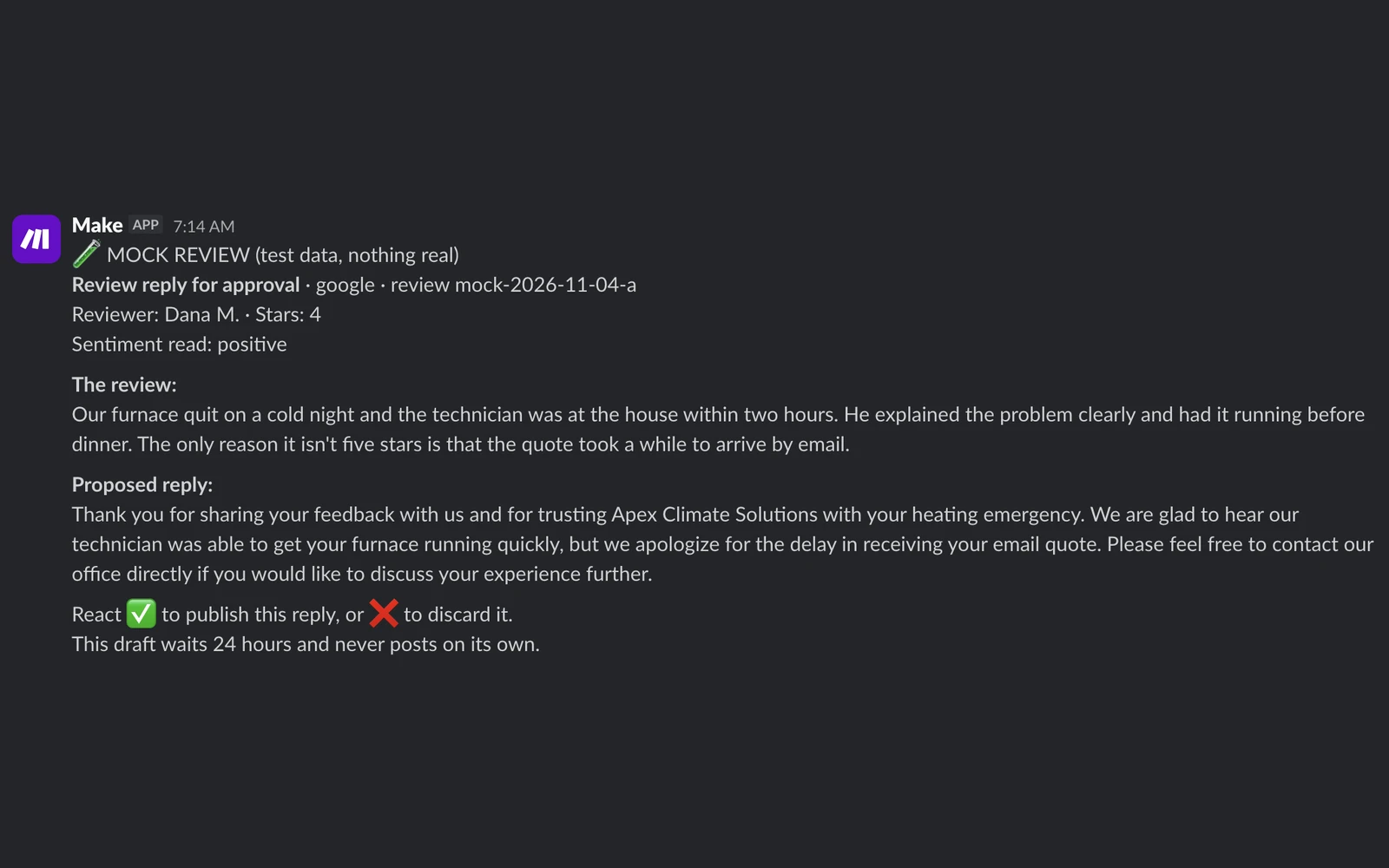
| Review reply drafter | Drafts a reply to a customer review | Gemini 3.5 Flash Lite; the person who approves each draft is the quality check | A poor public reply, if approved | No formal test | A person approves every draft in Slack; Yelp replies are posted by hand | Alert raised | Not measured | Built (approval gate); pulling and posting Google and Instagram reviews is design only |
The re-run rule. After any change to a tested step's prompt, model or reply length limit, its full test set runs again against the same pass rules before the change goes live.
Where a person decides: the urgency rating shows on the office screen as advice, and a dispatcher assigns the technician. Every review reply waits in Slack for a person's approval; posting to Google and Instagram is design only.
Built, design only, declined
Intake on WhatsApp, web form and an AI voice agent (web calls only; no phone number is rented); urgency rating, junk filter and extraction; technician answers; the watchdog digest, its summary of flagged jobs (tested on a copy of the database); the loop that updates truck stock from parts used; the review approval gate.
Pulling in and posting Google and Instagram reviews; sending job records into Jobber; WhatsApp calling; a retention-locked copy of the audit log (one that can't be altered or deleted).
A replay queue for failed sends (a person resends by hand); multi-region hosting and failover; detecting a manual edited outside the system.
Break it
When an AI reply is malformed or the call fails, a fixed rule takes a safe path, so the request still reaches a person.
Next section: Cost pageMost failures take a safe default or reach a person in Slack; the few that don't are named as accepted limits in the technical as-built.
Next section: BuildMost failures take a safe default or reach a person in Slack; the few that don't are named as accepted limits in the technical as-built. I designed the tests to find the AI's mistakes.
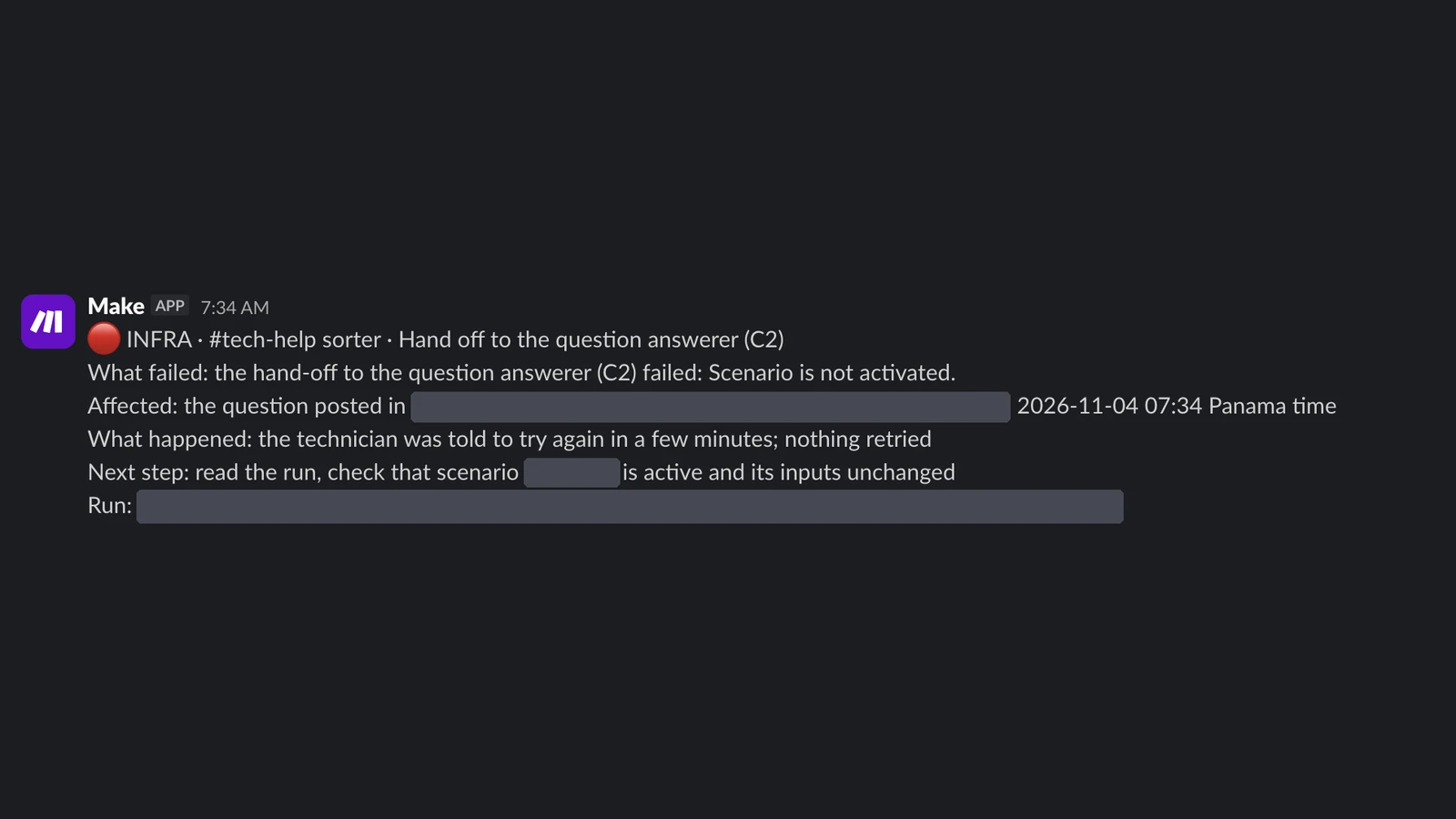
One failure route: if the urgency rater returns a reply that fails the format check, no job is created; the raw request is posted to #urgent for a person. Operational alerts use a fixed six-line format.
- Fixed rule
- AI call
- Failure route
What the tests caught
- The cheaper urgency model rated six "elderly relative, system fully down" messages as level 4 instead of 5.
- An independent check of the first junk-filter prompt found 7 of 36 replies added text after the expected reply, which would have broken the next step. My own tests had missed it.
- The junk filter's original model wrapped 140 of 144 replies in code formatting. A cleanup step had been hiding it.
- Asked about a Lennox furnace, the answer step replied from a generic furnace entry. Two prompt versions later, it leaked one of its own instructions into a reply. The AI judge, a second model that grades each answer, caught it.
- A test with a forged request crashed the check that verifies incoming messages, because the message body was empty. I fixed it the same day.
Only intake counts as essential. I asked of each component what would break if it were switched off. Intake is the only step where a delay costs a customer within minutes. For the watchdog the cost builds over days, and technicians can call the office, so I treat those two as important but not critical.
Record
I dated design decisions with their reasons, noted where a reason was never recorded, and from mid-September kept every open item in a backlog stating what had to be true for it to count as finished.
Next section: How I buildI kept two records. Design decisions went into the charter's dated decision log with the reasoning at the time; where a setting's date or reason was never recorded, the record says so rather than filling it in afterwards. From mid-September, every open item went into a Jira backlog with a definition of done: what had to be true to close it.
The public charter holds the scope, the architecture, the list of what's built, designed only or declined, and the decision log. How I run this kind of work, from charter to map to backlog to build and test, is on the How I build automation page.
Cost page
I measured the automation budget, found it 16% over plan, and projected it back under plan after four fixes.
How I build
How I plan, build and test an automation, with a check before I publish any claim.
Cost page
I estimated the budget, measured it over a month, then corrected it when the measurement came in 32 points higher.
As-built
The write-up of the system as built: how it's wired, what happens when a step fails, and where it differs from the plan. About a 20-minute read.
Post-project reflection
The four working rules I followed, from not grading my own work to checking every claim before publishing it, are on the How I build automation page.
What changes at real volume
- Apex's running cost follows message volume, not team size. At 30 to 40 messages a day, every day, it would rise from about $59 to $121 a month to about $173 to $273, including paid Slack (estimate). The cost page breaks this down and compares it with other options.
- The AI steps behind technician answers and the watchdog run on Google Gemini's free tier. Real customer data would need a paid Gemini plan; intake's AI steps already use Anthropic's paid API.
- In a heat wave, the two technicians covering one zone can't meet a 15-minute emergency response, whatever the software does. Apex can only make the shortfall visible.
What I'd do differently
- Before building, I'd talk to three to five shop owners about missed calls and job triage and what software they already use for the office work. Then I'd check which steps an existing tool already automates, so I build only what pays off and don't recreate what is already available.
- I'd measure the automation budget in the first full week instead of estimating it. My estimate was 84% of plan; the first measured month came in at 116%.
- I'd score every test in a separate session from the start. I first scored two tests in the session where I tuned them, and had to rescore them later. I'd also log every per-case result from the first run. I had to re-run the urgency rater's test because its per-case results weren't kept.
- I'd start every step with the simplest tool that does the job: a fixed rule first, a single AI call only where a step needs judgment, and an AI agent (one that plans its own steps) only where nothing simpler works. Intake began as an agent design and, behind the voice agent, turned out to need AI at just three points: spotting junk, pulling out the customer's details and rating urgency. Everything else became fixed rules.